Design an engraving for your Christmas ornament
A Christmas ornament is a thin wooden disc that is cut out by the laser as well as engraved. Natural Glow previews the light plywood or birch as the burn leaves it, Dark Charcoal a deeper mark and Light Opal a pale one. The outline and the hanging hole are drawn as a red cut line in the laser file.
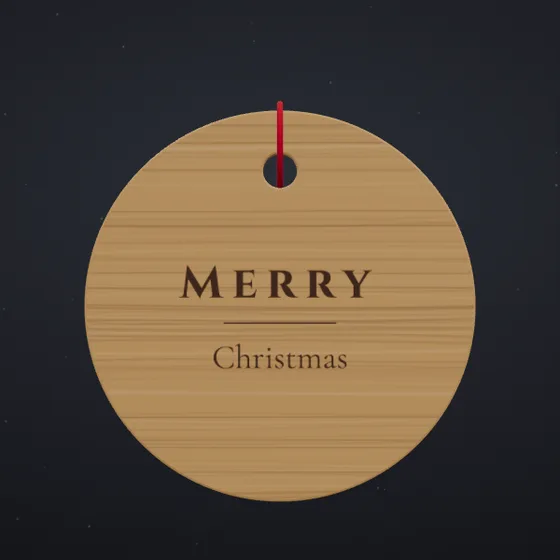
Christmas ornament: laser-cut disc with engraving and a hanging hole. Work area Ø 80 × 3 mm. Free to design.
- Work area
- Ø 80 × 3 mm
- Method
- laser-cut disc with engraving and a hanging hole
- Finishes
- 3 to preview
- Plan
- Free to design
Finishes
- Natural GlowPreview it in 3D before you cut
- Dark CharcoalPreview it in 3D before you cut
- Light OpalPreview it in 3D before you cut
Fine lines and legibility
At Ø 80 mm the disc is small, and 3 mm plywood chars quickly, so keep strokes around 0.4 mm or heavier and avoid very large solid fills, which can warp thin wood. Use the cut layer for the hanging hole and any decorative cut-outs such as stars, and engrave the rest.
What people make with it
Ornaments suit a child’s first Christmas with a name and a year, a family set with every member’s name, a pet ornament, a company gift or a memorial piece. Nesting many on a sheet makes a batch of fifty or a hundred a quick job.
Design tips
Add a small round hole near the top edge as a cut shape, set one line of text and a simple motif, and leave a clear margin around the hole so the string does not tear the edge. Sand lightly and wipe off soot before painting or sealing.
Engraving ideas for a Christmas ornament
- A first-Christmas ornament with a baby’s name and the year, one short line.
- A family set with one name per ornament and a matching snowflake motif.
- A pet ornament with a paw print, the pet’s name and the year.
- A company gift batch with the logo, nested fifty to a sheet in the laser file.
- A memorial ornament with a name, a date and a small star cut out of the disc.
Questions
How do I make the hanging hole?
Add a small circle shape near the top, set it to Cut through in the Inspector, and the laser file exports it as a red cut line. Keep it a few millimetres from the edge.
Related pages
 Design an engraving for your bamboo boardDesign an engraving for your bamboo board: laser-burned into bamboo. 220 × 150 mm. 3D preview, true-size SVG export.
 Design an engraving for your oak plaqueDesign an engraving for your oak plaque: laser-burned into solid oak. 180 × 120 × 12 mm. 3D preview, true-size SVG…
 Minimum line width by materialRule-of-thumb minimum line widths for engraving by material: wood, glass, slate, metal, leather, acrylic and cork. Ask…
Free to start, no account needed. Preview in 3D and export a true-size file.
Design on your Christmas ornament